Best Mouse Under 500 in India: 8 Proven Picks for Gaming, Office and Laptops (2026)
The best mouse under 500 in India for gaming, office and laptop use: wired RGB gaming mice, quiet wireless picks and a reliable Logitech, compared simply.

In this article
- Best Mouse Under 500: Quick Picks
- Wired or Wireless: Which Mouse Under 500 Makes Sense?
- What DPI Do You Really Need?
- Palm, Claw or Fingertip: Find Your Grip First
- Best Gaming Mouse Under 500
- Best Wireless Mouse Under 500
- Best Office Mouse Under 500
- Is a Mouse Under 500 Enough, or Should You Spend ₹1,000?
- Which Mouse Under 500 Should You Buy?
- How to Check a Cheap Mouse Before Buying
- Mistakes to Avoid When Buying a Mouse Under 500
- How to Make a Cheap Mouse Last Longer
- Final Word
A mouse is the one part of your computer you touch all day, yet most people buy whichever one is cheapest at the counter. That's a mistake, because the gap between a good and a bad cheap mouse is huge. A bad one jitters, double-clicks on its own and dies in six months. A good one feels smooth, tracks properly and keeps going for years. The good news is that the best mouse under 500 in India today is genuinely good, with features that cost ₹2,000 a few years ago.
This guide picks eight of them. The list starts from the Diwali sale picks shown by the YouTube channel Ten Tech Home, and we checked each model against its official Amazon listing. One model from the video, the Ant Esports GM320 Pro, isn't sold on Amazon.in right now, so we've swapped in a very close alternative from the same brand.
Updated 3 November 2026. Prices change daily, especially in sales. The prices here are approximate and were seen at the time of writing; check the live price before you buy.
Best Mouse Under 500: Quick Picks
If you play games, the Ant Esports GM320 is the best mouse under 500 for most people, and it's our top pick for the money. It has a 12,800 DPI optical sensor, eight programmable buttons, RGB lighting and a braided cable, and it often sells for less than ₹500 in sales. The EvoFox Blaze Ultra Value is a close second with a 1000 Hz polling rate.
If you want a wireless mouse for a laptop, the Portronics Toad 7 is the pick. It connects by Bluetooth and a 2.4 GHz dongle, and it charges by cable, so you never buy batteries. For a slim, quiet travel mouse, choose the Zebronics Blanc. And if you just need a simple mouse for office work that won't let you down, the Logitech B100 is still hard to beat, with a three-year warranty.
Wired or Wireless: Which Mouse Under 500 Makes Sense?
For gaming, the best budget mouse is almost always wired. At this price, a wired mouse gives you a better sensor, more buttons and zero lag for the same money. You also never have to think about charging. A braided cable, like the one on the Ant Esports and EvoFox mice, lasts much longer than a plain rubber one.
For a laptop you carry around, a wireless mouse is far nicer to use on the move. A small dongle or Bluetooth keeps your bag free of tangled cables, and you can use the mouse from your sofa. In addition, rechargeable wireless mice now cost under ₹500, so the old worry about batteries has mostly gone. Just remember that budget wireless mice use simpler sensors, so they suit work and casual use more than serious gaming.
What DPI Do You Really Need?
The box of every cheap gaming mouse shouts a big number like 12,800 DPI. However, DPI only tells you how far the pointer moves when you move the mouse. It doesn't tell you how accurate the sensor is. In fact, most gamers play at 800 to 1,600 DPI, and office users rarely go above 1,000.
So when you compare budget mice, don't pay extra for a bigger DPI figure. What matters more is the polling rate (how often the mouse reports to the computer; 1000 Hz is ideal), a good sensor that doesn't skip, and comfortable buttons. If you want the details, Wikipedia's page on mouse sensitivity explains how optical sensors and DPI work. For daily use, a DPI button with a few steps is all you need.
Palm, Claw or Fingertip: Find Your Grip First
Before you look at any model, notice how you hold a mouse. Most people use a palm grip, where the whole hand rests on the mouse. A bigger, rounded mouse like the Ant Esports GM320 feels best for this. Some gamers use a claw grip, with the fingers arched, and they often like a slightly shorter mouse.
A few people use a fingertip grip and barely touch the body. They prefer light, small mice, such as the slim Zebronics Blanc. There's no right or wrong grip, but the best mouse under 500 for you is one whose shape matches it. If you can, hold a similar mouse in a shop before ordering online.
Best Gaming Mouse Under 500
These five are wired mice made for games such as Valorant, BGMI on emulator, Free Fire on PC and GTA. All of them also work perfectly well for office work.
1. Ant Esports GM320 RGB Gaming Mouse
 Photo: Amazon.in
- Sensor: optical, adjustable up to 12,800 DPI.
- Buttons: eight programmable buttons with a rapid-fire key.
- Build: ergonomic right-hand shape with a braided cable.
- Lighting: RGB lighting you can change in the software.
The GM320 is the mouse we'd buy first. It feels more expensive than it is: the shape fills your palm, the side buttons are easy to reach, and the braided cable doesn't kink. Eight programmable buttons are useful even outside games, because you can set one for copy, one for paste and so on.
It usually sells for around ₹450–₹600, and in Diwali and other sales it often dips below ₹500. That's why it's our pick for the best mouse under 500 for gaming. The only thing to know is that it's shaped for right-handed users, so left-handers should look at the ambidextrous options below.
Check price on Amazon →Check price on Flipkart →
2. EvoFox Blaze Ultra Value Gaming Mouse
 Photo: Amazon.in
- Polling rate: 1000 Hz, the same as far costlier mice.
- Sensor: 200 to 12,800 DPI with 7000 fps tracking.
- Buttons: eight programmable buttons.
- Extras: RGB lighting with a music-sync mode and Windows software.
EvoFox is Amkette's gaming brand, and the Blaze is one of its best sellers. Its 1000 Hz polling rate means the mouse reports its position a thousand times a second, which makes aiming feel quick and smooth. The ambidextrous shape also suits left-handed players.
For gaming, this mouse is almost as good as the GM320, and the choice between the two often comes down to which one is cheaper on the day. The music-sync RGB is a fun extra for a gaming desk. If you play fast shooters, it's a very strong budget pick.
Check price on Amazon →Check price on Flipkart →
3. Ant Esports GM333 Gaming Mouse (Instead of the GM320 Pro)
 Photo: Amazon.in
- Why it's here: the GM320 Pro from the video isn't on Amazon.in, and this is its closest match.
- Sensor: optical, up to 12,800 DPI, with a 1000 Hz polling rate.
- Switches: Huano switches for crisp, long-lasting clicks.
- Cable: 1.5 m braided cable and software support.
The video recommends the Ant Esports GM320 Pro, but it isn't listed on Amazon.in at the moment. So we've picked the GM333, which sits in the same range with the same 12,800 DPI sensor and adds Huano switches. Huano switches are known for a clean, clicky feel and a long life.
The GM333 also comes in black, white and yellow, which is nice if you're building a colourful desk. Its price moves around ₹500–₹650, so wait for a sale offer if you want it under ₹500.
Check price on Amazon →Check price on Flipkart →
4. Zebronics Transformer-M Gaming Mouse
 Photo: Amazon.in
- Sensor: up to 3,600 DPI with a DPI switch.
- Buttons: six buttons, with two side keys for games.
- Lighting: multi-colour LED lights.
- Price: usually one of the cheapest gaming mice around ₹300–₹400.
The Transformer-M is a long-time favourite for first-time PC gamers. Its 3,600 DPI is lower on paper than the others, but remember the DPI section above: you'll rarely use more than 1,600 anyway. The two side buttons are handy for games and for going back and forward in your browser.
It's the best mouse under 500 if your budget is closer to ₹300 and you still want proper gaming buttons and lights. On the other hand, if you can stretch to the GM320 or Blaze, you'll get a better sensor and a braided cable.
Check price on Amazon →Check price on Flipkart →
5. HP M160 Wired Gaming Mouse
 Photo: Amazon.in
- Sensor: 1000 DPI optical tracking.
- Buttons: three buttons, rated for about 3 million clicks.
- Lighting: LED backlight.
- Warranty: one year from HP.
The HP M160 isn't a feature-packed gaming mouse. It's a basic mouse with gaming looks and the HP name, which means easy service. It's light, comfortable and simple to use, so it suits casual games and everyday work.
Choose it if you trust a big brand more than extra buttons. If you play competitive shooters, though, the Ant Esports or EvoFox mice above give you far more for similar money.
Check price on Amazon →Check price on Flipkart →
Best Wireless Mouse Under 500
These two are for laptops, travel and a clean desk. Both are rechargeable, so you never need to buy AA batteries.
6. Portronics Toad 7 Wireless Mouse
 Photo: Amazon.in
- Connection: Bluetooth 5.3 and a 2.4 GHz USB dongle.
- Sensor: adjustable up to 3,200 DPI.
- Battery: built-in rechargeable battery.
- Works with: laptops, tablets and phones that support a mouse.
The Toad 7 is the best wireless mouse under 500 for most people. Dual connection is the big win here: use the dongle on your laptop and Bluetooth on your tablet, or switch between two devices. That's a feature you usually see on mice that cost twice as much.
It's comfortable for long work days and charges by cable when the battery runs low. It isn't meant for serious gaming, but for office work, college and browsing, it's excellent value.
Check price on Amazon →Check price on Flipkart →
7. Zebronics Blanc Slim Wireless Mouse
 Photo: Amazon.in
- Connection: Bluetooth plus 2.4 GHz.
- Clicks: silent buttons, good for libraries and offices.
- Sensor: 800, 1,200 and 1,600 DPI steps.
- Style: slim body with multi-colour LED lights.
The Blanc is a slim mouse that slides easily into a laptop sleeve. Its silent clicks are a real plus if you work late at night or share a room, because there's no loud clicking. The LED lights give it a bit of style without looking like a gaming mouse.
Because it's slim, people with big hands may find it less comfortable for long sessions. For students and people who travel, however, it's one of the most practical choices under ₹500.
Check price on Amazon →Check price on Flipkart →
Best Office Mouse Under 500
Sometimes you just need a mouse that works every day and never gives trouble. This is that mouse.
8. Logitech B100 Wired Mouse
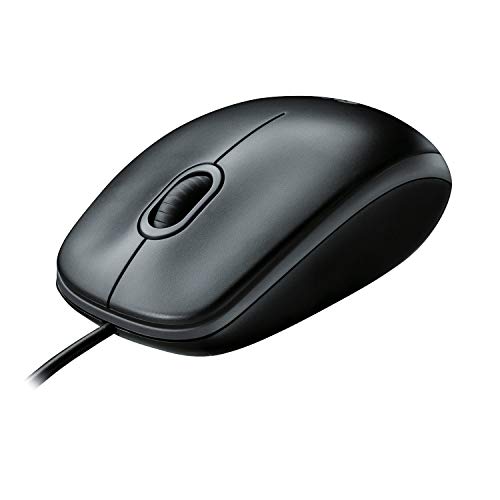 Photo: Amazon.in
- Sensor: 800 DPI optical tracking.
- Shape: ambidextrous, so it suits left and right hands.
- Warranty: three years, the longest on this list.
- Use: plug and play on Windows, Mac and Linux.
The B100 has been on office desks for years, and there's a reason. It's simple, tough and comfortable, and Logitech's three-year warranty is rare at this price. There's no software, no lights and nothing to set up. You plug it in and it works.
It's not for gaming, and 800 DPI feels slow on a big monitor. But for typing, spreadsheets and browsing, it's the safest buy here. Many offices buy it in bulk for exactly that reason.
Check price on Amazon →Check price on Flipkart →
Is a Mouse Under 500 Enough, or Should You Spend ₹1,000?
For most people, ₹500 is enough. The best mouse under 500 already gives you an optical sensor, a 1000 Hz polling rate, programmable buttons and RGB lighting. That covers office work, college, casual gaming and even ranked games for many players.
Spending ₹1,000 to ₹1,500 gets you a noticeably better sensor, lighter weight and stronger switches. So if you play competitive shooters for hours every day, it can be worth it. Otherwise, buy one of the mice above, use it for a year, and then decide whether you really need more. That way, your next upgrade is based on how you actually play.
Which Mouse Under 500 Should You Buy?
Start with what you do most, because the best mouse under 500 for a gamer isn't the best one for an office. If you play games for more than an hour a day, buy the Ant Esports GM320 or the EvoFox Blaze. Both have the sensor, buttons and cable quality that matter in games. If you're left-handed, pick the Blaze, because its shape works for both hands.
If you mostly carry a laptop, buy the Portronics Toad 7 for its two connection modes, or the Zebronics Blanc if you want something slim and silent. For an office desk or a parent's computer, the Logitech B100 is the no-fuss choice. In short, the best mouse under 500 is the one that fits your hand and your use, not the one with the biggest number on the box.
How to Check a Cheap Mouse Before Buying
First, read the sensor type. An optical sensor is fine for most surfaces, but very cheap mice with unnamed sensors can skip or jitter. Second, look for the polling rate. A 1000 Hz rate is a good sign in a gaming mouse.
Third, check the switches and the click life. Mice that list named switches, like Huano, or a click rating, like the HP's 3 million clicks, tend to last longer. Fourth, look at the cable. A braided cable survives being bent and pulled much better than a plain one. Finally, read the warranty. One year is normal; three years, like Logitech's, is a bonus.
Mistakes to Avoid When Buying a Mouse Under 500
The biggest mistake when buying the best mouse under 500 is paying for DPI. A 16,000 DPI mouse is not twice as good as an 8,000 DPI one, and you'll never use most of it. Another mistake is buying a heavy gaming mouse for a small hand. If the shape is wrong, your wrist will feel it after a few hours.
Also, don't buy a wireless mouse for serious gaming at this budget. Cheap wireless sensors are fine for work but can feel slower in fast games. And avoid unknown brands with no warranty, even if they look identical in photos. Ant Esports, EvoFox, Zebronics, Portronics, HP and Logitech all have proper service in India.
How to Make a Cheap Mouse Last Longer
Even a cheap mouse lasts longer with a little care. Use a mouse pad. It helps the sensor track better and stops the feet from wearing down on a rough table. A basic cloth pad costs very little and makes even the cheapest mouse feel smoother.
Keep the cable loose, not tightly bent around the laptop. Clean the sensor and the feet with a dry cloth now and then, because dust causes jittery movement. And for rechargeable wireless mice, don't leave them at 0% for weeks; charge them once in a while so the battery stays healthy. If you're upgrading your whole setup, see our guide to the best laptop for students in India.
Final Word
You don't need to spend more than ₹500 to get a good mouse in 2026. For gaming, the Ant Esports GM320 is the best mouse under 500 overall, with the EvoFox Blaze close behind. For a laptop, the Portronics Toad 7 and Zebronics Blanc give you rechargeable wireless convenience. And for simple office work, the Logitech B100 is the one that just keeps going. Buy during a sale, pick the shape that fits your hand, and add a mouse pad. For more gear at a sensible price, see our best headphones under 5000 guide too.
Frequently asked questions
Which is the best mouse under 500 in India?
For gaming, the Ant Esports GM320 with a 12,800 DPI sensor and eight programmable buttons. For a wireless laptop mouse, the Portronics Toad 7, and for simple office work, the Logitech B100.
Which is the best gaming mouse under 500?
The Ant Esports GM320 and the EvoFox Blaze Ultra Value are the best gaming mice under ₹500. Both are wired, have eight programmable buttons, RGB lighting and sensors up to 12,800 DPI.
Is a wireless mouse under 500 good for gaming?
It's fine for casual games, but not ideal for fast shooters. At this budget, a wired mouse gives you a better sensor and no lag, so buy wired for gaming and wireless for work and travel.
How much DPI is good for a mouse?
Most gamers play at 800 to 1,600 DPI, and office users rarely need more than 1,000. A high number like 12,800 DPI is mostly marketing; the sensor quality and a 1000 Hz polling rate matter more.
500 ke andar sabse achha mouse kaunsa hai?
Gaming ke liye Ant Esports GM320 ya EvoFox Blaze lo. Laptop ke liye wireless chahiye to Portronics Toad 7, aur office ke liye Logitech B100 sabse bharosemand hai.