RTX 4050 vs 5050 vs 5060: Which Gaming Laptop GPU Makes Sense Under ₹1 Lakh? (2026)
RTX 4050 vs 5050 vs 5060 explained simply: real price points in India, TGP, VRAM and DLSS, plus five RTX 4050 gaming laptops ranked by game tests.
In this article
- RTX 4050 vs 5050 vs 5060: Quick Answer
- The Right Price for Each GPU
- RTX 4050 vs 3050: How Big Is the Jump?
- RTX 4050 vs 5050 vs 5060: The Specs That Matter
- Why TGP Matters as Much as the GPU Name
- Which Games Were Tested, and Why the Rankings Change
- Five RTX 4050 Gaming Laptops, Ranked
- RTX 4050 vs 5050: Real-World Frame Rates
- Should You Stretch for an RTX 5050 Laptop?
- When Does RTX 5060 Make Sense?
- RTX 4050 vs 5050 for Video Editing and Streaming
- What Else to Check in a Gaming Laptop Under 1 Lakh
- RTX 4050 vs 5050: Which Lasts Longer?
- Is a Gaming Laptop Good for College?
- How to Look After a Gaming Laptop
- Mistakes to Avoid When Buying a Gaming Laptop
- Final Word
Buying a gaming laptop under ₹1 lakh used to be simple: you picked the newest graphics card you could afford. In 2026 it's confusing. RTX 3050, 4050, 5050 and 5060 laptops all sit close together, prices have jumped because of costlier memory, and the same GPU can perform very differently in two laptops. So before you spend a lakh, it's worth understanding RTX 4050 vs 5050 vs 5060 properly.
This guide is based on a video by Techum, where the creator explains which GPU fits which budget and ranks five RTX 4050 laptops by testing the same five games on each. We've rewritten his findings simply, added a clear GPU comparison, and checked every laptop's official Amazon listing.
Updated 3 November 2026. Gaming laptop prices have been rising, and they differ between Amazon and Flipkart. Prices here are approximate and were seen at the time of writing.
RTX 4050 vs 5050 vs 5060: Quick Answer
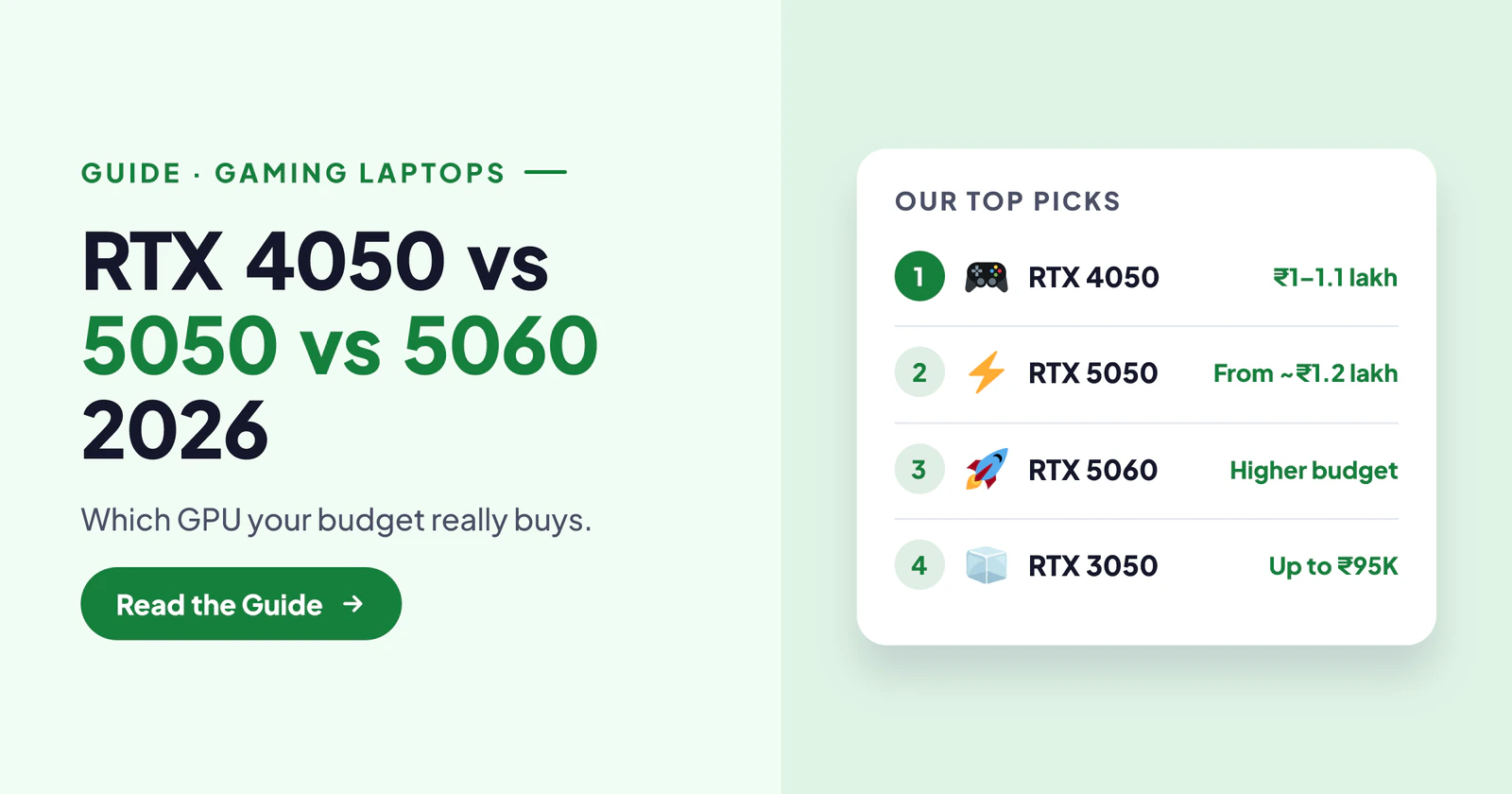
Under ₹1 lakh, RTX 4050 is the card to buy right now. RTX 5050 laptops were available near ₹1 lakh about a month before the video, but prices have moved up, and new RTX 5050 laptops now start closer to ₹1.2 lakh. If you see a cheap RTX 5050 laptop, it usually has a weak processor or it's a second-hand unit.
RTX 5060 sits a step above the 5050 and belongs to a higher budget. So the real choice at ₹1 lakh is RTX 4050, and the real question is which RTX 4050 laptop. The creator's ranking puts the HP Victus with Core i5-13450HX on top as the best all-rounder.
The Right Price for Each GPU
The creator gives a simple price rule, and it's the most useful part of the video. An RTX 3050 laptop makes sense up to about ₹80,000–₹95,000. Don't pay close to ₹1 lakh for a 3050.
An RTX 4050 laptop is right between ₹1 lakh and ₹1.1 lakh. Don't pay ₹1.2 lakh for a 4050, because RTX 5050 laptops start around that price. Above that, RTX 5050 and then RTX 5060 make sense as your budget grows. Follow this ladder, and you won't overpay for an older GPU.
RTX 4050 vs 3050: How Big Is the Jump?
According to the creator, RTX 4050 is about 30% faster than RTX 3050 in games. That's a noticeable jump: smoother frame rates, higher settings and more headroom for newer games. The 4050 also supports DLSS 3 frame generation, which can raise frame rates further in supported games.
So if the price gap between a 3050 and a 4050 laptop is small, always choose the 4050. A 3050 only makes sense when it's clearly cheaper, around the ₹80,000–₹95,000 mark.
RTX 4050 vs 5050 vs 5060: The Specs That Matter
On paper, the RTX 4050 laptop GPU has 6GB of GDDR6 memory, while the RTX 5050 and 5060 laptop GPUs have 8GB of faster GDDR7. The 5060 also has more CUDA cores than the 5050, which makes it the strongest of the three. Both 50-series cards support DLSS 4 with multi-frame generation in supported games. You can see NVIDIA's own overview on NVIDIA's GeForce laptops page.
In practice, the extra 2GB of VRAM matters more each year, because new games use more memory at high textures. That's the main reason the 5050 and 5060 age better. But on a ₹1 lakh budget, a well-cooled RTX 4050 laptop with a strong CPU still runs today's games smoothly at Full HD.
Why TGP Matters as Much as the GPU Name
TGP, or total graphics power, is how many watts the laptop lets the GPU use. The higher the TGP, the faster the same GPU runs. For example, the Lenovo LOQ in the video runs its RTX 4050 at 65W, while the HP Victus runs it at 75W, and that 10W difference shows up in heavy games like Red Dead Redemption 2 and Cyberpunk 2077.
So when you compare RTX 4050 vs 5050 laptops, always check the TGP on the spec sheet. A 5050 at low wattage can lose to a 4050 at high wattage. You can read more about laptop GPUs on Wikipedia's GeForce 40 series page.
Which Games Were Tested, and Why the Rankings Change
The creator used five popular games: Valorant, GTA 5, Red Dead Redemption 2, Forza Horizon and Cyberpunk 2077. That's a smart mix, because it covers two kinds of games. Valorant and GTA 5 lean heavily on the processor, so a stronger CPU gives more frames. RDR2, Forza and Cyberpunk lean on the graphics card, so GPU power and TGP decide the result.
That's why the rankings shift from game to game. A laptop with a strong Ryzen chip can win in Valorant but lose in Cyberpunk to a laptop with a higher-wattage GPU. The best laptops in the list are the ones that are strong in both, which is exactly what the top two HP Victus models manage.
Five RTX 4050 Gaming Laptops, Ranked
The creator tested the same five games on all five laptops and ranked them by the results, from the starting option to the best all-rounder. All have RTX 4050, 16GB RAM, 512GB SSD and a 15.6-inch 144 Hz screen.
5. Lenovo LOQ Essential (Ryzen 7, RTX 4050)
 Photo: Amazon.in
- GPU: RTX 4050 6GB at 65W TGP.
- Display: 15.6-inch Full HD IPS, 144 Hz, 100% sRGB.
- Memory: 16GB DDR5, upgradable to 32GB; 512GB SSD, also upgradable.
- Games: 220+ fps in Valorant and 120+ fps in GTA 5 on high settings in the video.
The LOQ is the most affordable of the five and easily fits under ₹1 lakh. The video's unit had a Ryzen 7 7735HS; on Amazon.in, the LOQ Essential lists a Ryzen 7 170, a renamed chip from the same Ryzen 7 family. All the heavy games in the test, including RDR2, Forza Horizon and Cyberpunk, played smoothly at high to very high settings.
Its standout feature is the 100% sRGB screen, which shows accurate colours. That makes it the best pick here for gamers who also edit photos or videos. The lower 65W TGP is why it ranks last in heavy games.
Check price on Amazon →Check price on Flipkart →
4. HP Victus (Core i5-13420H, RTX 4050)
 Photo: Amazon.in
- GPU: RTX 4050 6GB at 75W TGP.
- CPU: 13th Gen Intel Core i5-13420H.
- Display: 15.6-inch Full HD IPS, 144 Hz.
- Extras: MS Office included.
This HP Victus beats the LOQ in GPU-heavy games like RDR2, Forza Horizon and Cyberpunk, thanks to its higher 75W TGP. In CPU-heavy games like Valorant and GTA 5, it's a little behind the LOQ, because the Ryzen 7 handles multi-core work better than the i5-13420H.
Choose it if you mainly play heavy, graphics-intensive games. In the RTX 4050 vs 5050 comparison, it shows how much a higher TGP lifts the older card. The RAM and SSD are upgradable, so it can grow with you.
Check price on Amazon →Check price on Flipkart →
3. Acer Aspire 7 (Core 5 210H, RTX 4050)
 Photo: Amazon.in
- CPU: Intel Core 5 210H, a newer-generation chip.
- GPU: RTX 4050 6GB.
- Display: 15.6-inch, 144 Hz.
- Extras: MS Office included.
The Aspire 7 matches the HP Victus in GPU-heavy games and does better in CPU-heavy titles like Valorant and GTA 5, because of its newer Core 5 210H processor. That makes it a balanced choice for both kinds of games.
The rest of the specs are nearly identical to the Victus. If you find it at the same price, the Aspire 7's better CPU makes it the smarter buy.
Check price on Amazon →Check price on Flipkart →
2. HP Victus (Ryzen 7 7445HS, RTX 4050)
 Photo: Amazon.in
- CPU: AMD Ryzen 7 7445HS with strong multi-core performance.
- GPU: RTX 4050 6GB at 75W TGP.
- Memory: 16GB DDR5-5600, upgradable to 32GB.
- Display: 15.6-inch, 144 Hz, 300 nits; MS Office and a year of Microsoft 365 Basic.
This Victus combines a strong CPU with a 75W RTX 4050, so it performs well in both CPU-heavy and GPU-heavy games. The creator notes that frame rates stay more stable, so games feel less laggy during busy scenes.
Its price moves roughly between ₹1.05 lakh and ₹1.12 lakh, so wait for a dip. Fast DDR5-5600 RAM also helps performance. It's a great all-round pick if you prefer AMD.
Check price on Amazon →Check price on Flipkart →
1. HP Victus (Core i5-13450HX, RTX 4050)
 Photo: Amazon.in
- CPU: Intel Core i5-13450HX, the strongest processor in this group.
- Memory: 16GB dual-channel DDR5-5600 RAM.
- GPU: RTX 4050 6GB.
- Display: 15.6-inch Full HD IPS, 144 Hz; RAM and SSD upgradable.
The creator calls this the all-round best gaming laptop under ₹1 lakh, and the test results back him up. The HX-series processor is a class above the H-series chips in the other laptops, and dual-channel DDR5 RAM directly lifts frame rates. It topped every game in the test, CPU-heavy or GPU-heavy.
If you're deciding between RTX 4050 vs 5050 on a ₹1 lakh budget, this laptop is the strongest argument for the 4050. Check both Amazon and Flipkart, because its price can differ between them.
Check price on Amazon →Check price on Flipkart →
RTX 4050 vs 5050: Real-World Frame Rates
Numbers on a spec sheet only mean something in games. In the video, even the most affordable RTX 4050 laptop, the Lenovo LOQ, crossed 220 fps in Valorant and 120 fps in GTA 5 on high settings, and ran RDR2, Forza Horizon and Cyberpunk smoothly at high to very high settings. The four laptops above it did even better.
So for Full HD gaming at 144 Hz, an RTX 4050 is more than capable today. The RTX 4050 vs 5050 gap shows up mainly in the newest, heaviest games with high textures and ray tracing, where the 5050's extra VRAM and DLSS 4 help. For esports and most popular titles, a good 4050 laptop already feels fast.
Should You Stretch for an RTX 5050 Laptop?
If your budget can reach about ₹1.2 lakh, an RTX 5050 laptop with a good CPU is a sensible step up. You get 8GB of VRAM, DLSS 4 and better longevity for new games. But don't buy an RTX 5050 laptop with a weak, older processor just because the GPU name is newer. A strong CPU with a 4050 often beats a weak CPU with a 5050 in real games.
Also be careful with suspiciously cheap RTX 5050 listings. As the creator warns, they're often second-hand or come with compromises. Check the seller, warranty and full specs before paying, and ask for the GST invoice so your warranty claim is never refused later.
When Does RTX 5060 Make Sense?
RTX 5060 makes sense when you want to play the newest games at high settings for several years, or you stream and edit as well as game. It's clearly faster than the 5050, with more CUDA cores and 8GB of GDDR7.
The catch is price: RTX 5060 laptops sit well above ₹1 lakh. If your budget is fixed at a lakh, a strong RTX 4050 laptop is the smarter buy today. If you can save more, RTX 5060 is the GPU that will feel comfortable for the longest time. For more higher-budget picks, see our best laptop under 1 lakh guide.
RTX 4050 vs 5050 for Video Editing and Streaming
For editing in Premiere Pro or DaVinci Resolve, the GPU helps with effects and exports. Both cards include NVIDIA's video encoders, which also power smooth streaming on OBS. The 5050's newer encoder and extra VRAM help with bigger timelines, but a 4050 handles Full HD editing and streaming well.
For editors, the screen matters as much as the GPU. That's why the Lenovo LOQ's 100% sRGB display is worth noting; accurate colours make colour grading far easier.
What Else to Check in a Gaming Laptop Under 1 Lakh
The GPU is only part of the story. Check the CPU, because HX and newer H-series chips make a big difference in CPU-heavy games. Look for 16GB of DDR5 RAM, ideally in dual channel, and make sure it's upgradable. A 144 Hz screen is the standard to expect at this price, and anything lower feels dated.
Cooling matters too. A laptop that runs hot throttles and loses performance. Read reviews about fan noise and temperatures. Finally, compare prices on Amazon and Flipkart, since they can differ by several thousand rupees.
RTX 4050 vs 5050: Which Lasts Longer?
The RTX 5050's 8GB of VRAM gives it an edge for future games, which increasingly need more than 6GB at high texture settings. If you plan to keep the laptop for four or five years, that's worth considering.
That said, you can extend an RTX 4050 laptop's life by lowering textures slightly and using DLSS. With a strong CPU and upgradable RAM, a good RTX 4050 laptop will still play most games comfortably for years.
Is a Gaming Laptop Good for College?
It can be, with trade-offs. A gaming laptop handles coding, design software, video editing and games easily, so engineering and design students get a lot of value from it. The 144 Hz screen and strong CPU make everything feel quick.
But gaming laptops weigh over two kilograms, their chargers are large, and battery life is short when the GPU is in use. If you'll carry it to class every day, expect a heavy bag. Many students solve this by keeping the gaming laptop on a desk and using it mainly in the hostel or at home.
How to Look After a Gaming Laptop
Heat is the enemy of performance. Use the laptop on a hard, flat surface, not on a bed or pillow, so the vents can breathe. A simple cooling pad helps during long sessions. Clean the vents every few months, because dust slowly raises temperatures and fan noise.
Keep the GPU drivers updated through NVIDIA's app, since new drivers often improve game performance. Use the laptop plugged in while gaming, because performance drops on battery. And if your RAM is single-channel, adding a matching stick for dual-channel can give a real boost in many games.
Mistakes to Avoid When Buying a Gaming Laptop
The biggest mistake is paying the wrong price for a GPU: an RTX 3050 near ₹1 lakh, or an RTX 4050 at ₹1.2 lakh. The second is ignoring TGP and the CPU, and judging only by the GPU name. The third is buying a cheap RTX 5050 laptop with a weak processor or from a doubtful seller.
Also, don't skip cooling and RAM checks, and don't forget that gaming laptops are heavy, usually over two kilograms. If you need something light for college, a gaming laptop may not be the right tool. For budget options, see our best laptop under 40000 guide.
Final Word
In the RTX 4050 vs 5050 vs 5060 debate, your budget decides. Under ₹1 lakh, RTX 4050 is the card to buy, ideally around ₹1–1.1 lakh. Around ₹1.2 lakh, RTX 5050 with a good CPU makes sense, and RTX 5060 is for bigger budgets. Among the five RTX 4050 laptops tested, the HP Victus with Core i5-13450HX is the best all-rounder, the Ryzen 7 7445HS Victus is close behind, and the Lenovo LOQ is the pick for creators thanks to its colour-accurate screen. Check TGP, the CPU and the price on both stores, and you'll get the most gaming for your money.
Frequently asked questions
RTX 4050 vs 5050: which is better under 1 lakh?
Under ₹1 lakh, RTX 4050 is the practical choice, because new RTX 5050 laptops now start around ₹1.2 lakh. A strong-CPU RTX 4050 laptop like the HP Victus with i5-13450HX is the best all-rounder.
How much faster is RTX 4050 than RTX 3050?
About 30% faster in games, according to the video's tests, and it adds DLSS 3 frame generation. Buy a 3050 only if it's clearly cheaper, around ₹80,000–₹95,000.
Is RTX 5060 worth it over RTX 5050?
Yes, if your budget allows. The 5060 has more CUDA cores and the same 8GB of GDDR7, so it plays new games at higher settings for longer. It costs well above ₹1 lakh.
What is TGP in a gaming laptop?
TGP is the power, in watts, a laptop allows its GPU to use. Higher TGP means more performance from the same GPU, so a 75W RTX 4050 beats a 65W one in heavy games.
1 lakh ke andar gaming laptop kaunsa le?
1 lakh ke andar RTX 4050 wala laptop lo. HP Victus i5-13450HX sabse achha all-rounder hai, aur editing bhi karni hai to 100% sRGB screen wala Lenovo LOQ dekho.