Best SSD in India (2026): 11 Proven Picks for Laptops and PCs, Plus External SSDs and RAM
The best SSD in India for laptops and PCs: NVMe Gen 3 and Gen 4 picks, a SATA SSD for old laptops, rugged external SSDs, DDR4 RAM and an NVMe enclosure.
In this article
- Best SSD in India: Quick Picks
- NVMe vs SATA SSD in India: Which Does Your Laptop Need?
- How to Check What Your Laptop Supports
- Gen 3 vs Gen 4: Is the Faster SSD Worth It?
- Best NVMe SSD in India (Gen 4)
- Best Budget SSD in India
- Best External SSD in India
- RAM and an Enclosure: Two Smart Add-Ons
- Best SSD in India for Gaming PCs and PS5
- How Much SSD Storage Do You Need?
- SSD Warranty and TBW in India: How Long Does It Last?
- How to Install an SSD in Your Laptop
- Mistakes to Avoid When Buying the Best SSD in India
- External SSD vs Hard Disk vs Pen Drive
- Final Word
If your laptop takes a minute to boot and apps load slowly, the cheapest upgrade that makes the biggest difference is an SSD. Swapping an old hard disk for an SSD can make a five-year-old laptop feel almost new, and adding a fast NVMe drive to a gaming PC cuts load times sharply. The tricky part is choosing, because there are NVMe, SATA, Gen 3, Gen 4, internal and external drives, all with different speeds and prices. This guide picks the best SSD in India for each need.
Our list is built from a sale video by TechRx Zone, which covered NVMe SSDs, external SSDs, DDR4 RAM and enclosures. We checked each product against its official Amazon listing and added simple advice on what fits your laptop or PC.
Updated 3 November 2026. Storage prices move a lot, and they've risen in recent months because of memory chip demand. Prices here are approximate and were seen at the time of writing.
Best SSD in India: Quick Picks
For most laptops and PCs with an M.2 slot, the Crucial P310 1TB is the best SSD in India for the money. It's a fast PCIe Gen 4 drive with 7,100 MB/s read speeds. The WD Blue SN5000 is a dependable Gen 4 alternative with a five-year warranty, and the Crucial T500 and SanDisk Optimus 5100 are top picks for gaming PCs.
On a tight budget, the EVM 512GB Gen 3 NVMe is a solid starter drive. For older laptops without an M.2 slot, the Ant Esports 690 Neo SATA SSD replaces the hard disk. For carrying files, the Samsung T7 Shield and SanDisk Extreme are the best external SSDs. And if your PC also needs more memory, the Corsair Vengeance LPX 16GB is a reliable DDR4 RAM upgrade.
NVMe vs SATA SSD in India: Which Does Your Laptop Need?
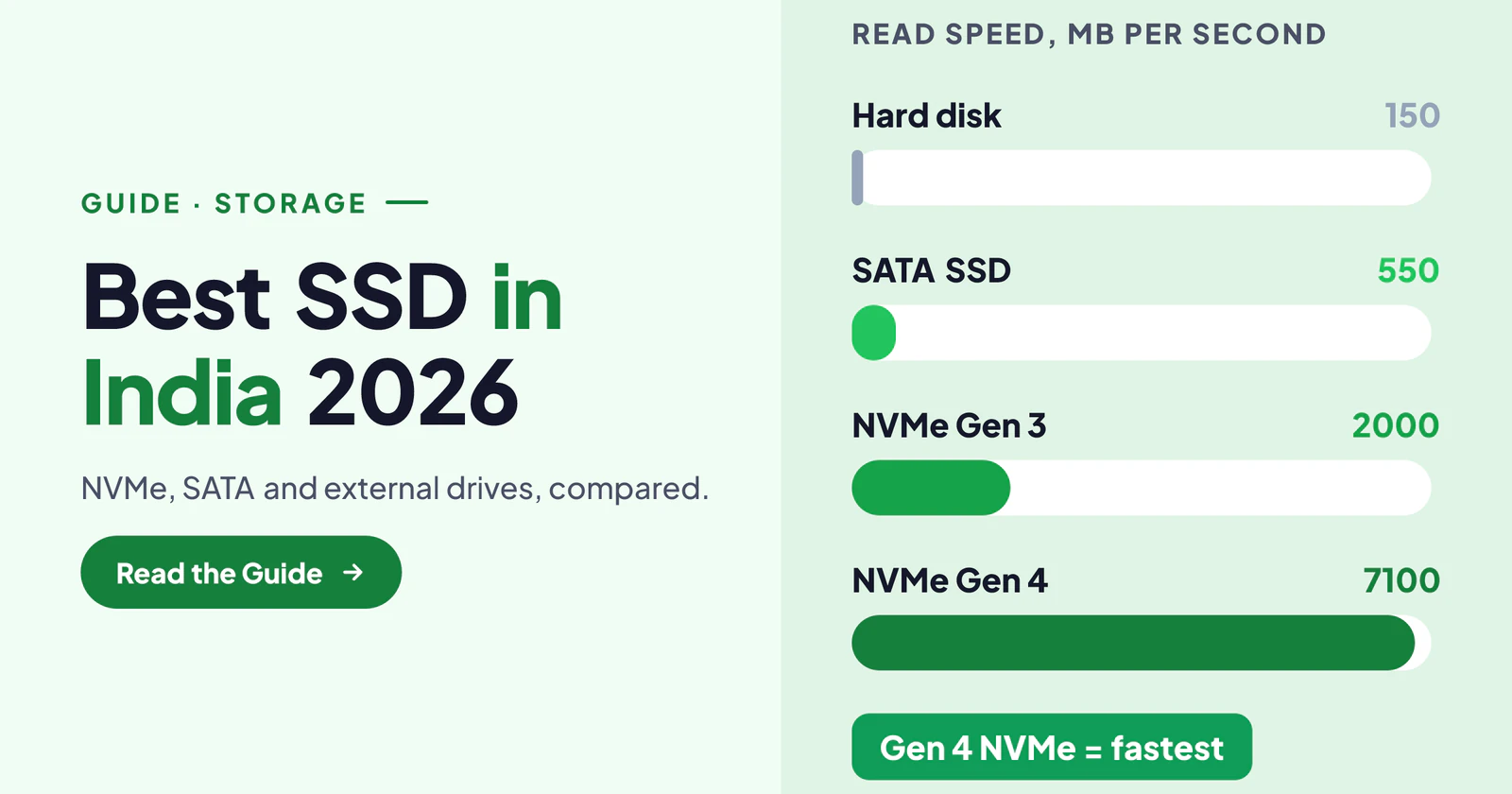
There are two main types of internal SSD. A SATA SSD looks like a small 2.5-inch box and connects where a laptop hard disk used to sit. It tops out at about 550 MB/s, which is still around four times faster than a hard disk. An NVMe SSD is a thin stick that plugs into an M.2 slot and runs over PCIe, reaching 2,000 to 7,000 MB/s or more.
The best SSD in India for you depends on your laptop, not on your wish. Most laptops from the last five or six years have an M.2 NVMe slot. Older laptops often have only a 2.5-inch SATA bay. You can read how the M.2 format works on Wikipedia's M.2 page.
How to Check What Your Laptop Supports
The easiest way is to search your exact laptop model with "SSD upgrade" or check the manual on the maker's website. It will tell you whether you have an M.2 slot, whether it supports NVMe or only SATA, and whether there's a free second slot.
Also check the size of the slot. Most use 2280 drives (22 mm wide, 80 mm long), and every NVMe drive in this guide is 2280. Some thin laptops use shorter 2242 or 2230 drives. Finally, see whether the slot is PCIe Gen 3 or Gen 4. A Gen 4 drive works in a Gen 3 slot, but only at Gen 3 speeds.
Gen 3 vs Gen 4: Is the Faster SSD Worth It?
Gen 3 NVMe drives reach roughly 2,000 to 3,500 MB/s, while Gen 4 drives reach 5,000 to 7,500 MB/s. In daily use, like booting Windows, opening Chrome or Office, the difference is small, because both feel instant compared with a hard disk.
Gen 4 helps more with big file copies, video editing and large games. Since good Gen 4 drives now cost only a little more than Gen 3, we suggest Gen 4 if your laptop or PC supports it. On an older Gen 3 system, a budget Gen 3 drive is perfectly fine. Gen 5 drives exist, but they're expensive and run hot, so they don't make sense for most people yet.
Best NVMe SSD in India (Gen 4)
These are the fastest internal drives in this guide, ideal for modern laptops and gaming PCs. If you want the best SSD in India for raw speed, start here.
1. Crucial P310 1TB Gen 4 NVMe
 Photo: Amazon.in
- Speed: up to 7,100 MB/s read on PCIe Gen 4.
- Form: M.2 2280; also sold with an integrated heatsink for desktops.
- Brand: Crucial, the consumer brand of memory maker Micron.
- Best for: laptops and PCs with a Gen 4 M.2 slot.
The P310 is the drive we'd recommend to most people. It's fast, efficient and comes from Micron, one of the world's biggest memory chip makers. In a laptop, it runs cool enough without a heatsink. For a desktop motherboard without its own heatsink, the version with an integrated heatsink keeps temperatures down.
At 1TB, you have room for Windows, apps and a few big games. If you want one fast internal drive without overthinking, this is the best SSD in India for most buyers.
Check price on Amazon →Check price on Flipkart →
2. WD Blue SN5000 NVMe
 Photo: Amazon.in
- Speed: up to 5,000 MB/s read on the 500GB model; the 1TB is faster.
- Warranty: five years.
- Form: M.2 2280, PCIe Gen 4.
- Best for: everyday laptops, work PCs and light gaming.
The WD Blue SN5000 is a dependable, sensible Gen 4 drive. It's not the fastest on paper, but it's efficient and steady, which matters more in a laptop than peak speed. The five-year warranty adds peace of mind.
It comes in 500GB and 1TB versions. For a work laptop with mostly documents and browsers, 500GB is enough. For photos, videos or games, choose 1TB.
Check price on Amazon →Check price on Flipkart →
3. Crucial T500 1TB
 Photo: Amazon.in
- Speed: up to 7,300 MB/s read.
- Use: laptop and desktop compatible.
- Extra: bundled with a one-month Adobe Creative Cloud offer at the time of writing.
- Best for: gamers and video editors.
The T500 is one of the fastest Gen 4 drives you can buy, and it's a favourite in gaming PCs and PlayStation 5 upgrades (with a heatsink). Big games install and load quickly, and large video files copy in moments.
It usually costs a bit more than the P310. If you edit video or play big games, the extra speed and sustained performance are worth it.
Check price on Amazon →Check price on Flipkart →
4. SanDisk Optimus 5100 1TB
 Photo: Amazon.in
- Speed: up to 7,100 MB/s read and 6,700 MB/s write.
- Warranty: five years.
- Form: M.2 2280, PCIe Gen 4.
- Best for: gaming storage and heavy workloads.
SanDisk's Optimus line replaces the older WD Black-style drives for gamers. The 5100 has excellent read and write speeds, so it handles big game updates and file transfers well. The five-year warranty matches the best here.
Choose it if you find it cheaper than the T500 on the day, because performance is in the same class.
Check price on Amazon →Check price on Flipkart →
Best Budget SSD in India
If you're upgrading an older laptop or building a budget PC, these save money without feeling slow. The best SSD in India doesn't have to be the fastest one.
5. EVM 512GB NVMe Gen 3
 Photo: Amazon.in
- Speed: up to about 1,950 MB/s read.
- Form: M.2 2280, PCIe Gen 3.
- Brand: EVM, an Indian brand with a local warranty network.
- Best for: budget laptop upgrades and office PCs.
EVM drives are popular budget picks in India, and the 512GB NVMe is a good value starter drive. It's much faster than any hard disk and plenty quick for Windows, Office and browsing.
It's not built for heavy video work, but for a student laptop or office PC, it's an easy, affordable upgrade.
Check price on Amazon →Check price on Flipkart →
6. Ant Esports 690 Neo SATA SSD
 Photo: Amazon.in
- Type: 2.5-inch SATA SSD, up to 500 MB/s read.
- Fits: laptops and PCs with a hard disk bay.
- Capacity: 256GB and larger options.
- Best for: bringing an old laptop back to life.
If your laptop has no M.2 slot, this is the upgrade to buy. Replace the hard disk with this SATA SSD, and boot times drop from a minute or more to a few seconds. Apps open quickly, and the laptop stops freezing while it reads files.
For the price of a dinner out, it can save you from buying a new laptop. Choose 512GB if you keep many files on the laptop.
Check price on Amazon →Check price on Flipkart →
Best External SSD in India
External SSDs are pocket-size drives for backups, carrying projects and editing on the go. They're far faster and tougher than old portable hard disks, and they're the best SSD in India for anyone who carries files around.
7. Samsung T7 Shield
 Photo: Amazon.in
- Speed: up to 1,050 MB/s over USB 3.2 Gen 2.
- Toughness: rugged rubber body, IP65 water and dust resistance.
- Works with: Windows, Mac, Android phones and consoles.
- Capacity: 1TB, 2TB and 4TB.
The T7 Shield is one of the most trusted external SSDs. Its rubbery shell survives knocks and drops, and IP65 protection means a splash or dust won't harm it. Photographers and video creators love it for copying footage quickly.
It's also a great backup drive for your laptop. Plug it in once a week, back up your important folders, and you're protected if your laptop ever fails.
Check price on Amazon →Check price on Flipkart →
8. SanDisk Extreme Portable SSD
 Photo: Amazon.in
- Speed: up to 1,050 MB/s read and 1,000 MB/s write.
- Toughness: 3 m drop protection and IP65 rating.
- Warranty: five years.
- Extra: a loop to clip it onto a bag.
The SanDisk Extreme is the T7 Shield's closest rival, with the same speed class and a five-year warranty. The carabiner loop is handy for travel, and the drive is light enough to forget it's in your bag.
Choose between the two based on price on the day; both are excellent. For bigger files, consider the 2TB version.
Check price on Amazon →Check price on Flipkart →
RAM and an Enclosure: Two Smart Add-Ons
The video also covered DDR4 RAM and SSD enclosures, which pair nicely with an SSD upgrade.
9. Corsair Vengeance LPX 16GB DDR4
 Photo: Amazon.in
- Type: DDR4 desktop RAM (UDIMM), up to 3,200 MHz.
- Capacity: 16GB single stick.
- Design: low-profile heat spreader that fits under big coolers.
- Note: desktop only; laptops need SO-DIMM RAM.
If your desktop PC has 8GB of RAM, adding a 16GB stick makes multitasking and gaming much smoother. Corsair's Vengeance LPX is a reliable, widely used choice that fits most DDR4 motherboards.
Check your motherboard's supported speed and slot count first. And remember, this is desktop RAM; laptops use smaller SO-DIMM modules, so don't order this for a laptop.
Check price on Amazon →Check price on Flipkart →
10. EVM Elite 8GB DDR4
 Photo: Amazon.in
- Type: DDR4 desktop RAM, 3,200 MHz, CL15.
- Support: Intel XMP and AMD EXPO profiles.
- Warranty: ten years.
- Best for: budget PC upgrades.
EVM's Elite RAM is a budget-friendly way to go from 8GB to 16GB in a desktop. The ten-year warranty is remarkable at this price, and the aluminium heat sink looks neat.
Pair two matching sticks for dual-channel performance, which helps integrated graphics and games.
Check price on Amazon →Check price on Flipkart →
11. ORICO M.2 NVMe Enclosure
 Photo: Amazon.in
- Use: turns an M.2 SSD into a fast external drive.
- Speed: USB-C 3.2 Gen 2, up to 10 Gbps for NVMe.
- Fits: NVMe and M.2 SATA drives from 2230 to 2280.
- Design: tool-free aluminium case.
When you upgrade your laptop's SSD, the old drive doesn't have to go in a drawer. Put it in this enclosure, and it becomes a quick external drive for backups and file transfers.
It's also a cheaper way to build a large external SSD: buy an internal NVMe drive and this enclosure, and you often spend less than on a branded portable SSD of the same size.
Check price on Amazon →Check price on Flipkart →
Best SSD in India for Gaming PCs and PS5
For gaming, a fast Gen 4 drive makes a real difference in load times and open-world games that stream data constantly. The Crucial T500 and SanDisk Optimus 5100 are the best SSD in India for gamers in this guide, with the Crucial P310 close behind.
If you're adding storage to a PlayStation 5, choose a Gen 4 drive with a heatsink, or add a slim M.2 heatsink yourself, as Sony recommends. For a gaming laptop, check whether there's a second M.2 slot; many have one, so you can add a 1TB drive just for games without touching Windows.
How Much SSD Storage Do You Need?
For a basic office or student laptop, 512GB is enough for Windows, apps and documents. If you keep photos, videos or a few games, choose 1TB. Gamers and video editors should look at 1TB or 2TB, because modern games can take 100GB each.
Also, don't fill an SSD to the brim. SSDs slow down slightly when they're almost full, so keep about 10–15% free. If you need lots of space for old files, pair a fast internal SSD with an external drive for storage.
SSD Warranty and TBW in India: How Long Does It Last?
Every SSD has a TBW rating, short for terabytes written. It tells you how much data you can write before the drive may start to wear out. A 1TB drive is often rated for 600 TB or more, which is many years of normal use.
So don't worry too much about SSD life for home use. Focus on the warranty instead; five years, like WD, SanDisk and many others offer, is a good sign. You can read more about how NVMe drives work on Wikipedia's NVM Express page.
How to Install an SSD in Your Laptop
First, back up your files. Then decide whether you'll clone your old drive or do a fresh Windows install. A fresh install is cleaner and faster; cloning keeps everything as it is. Free tools from SSD makers can clone your drive using a USB adapter or enclosure.
Next, switch off the laptop, unplug it and remove the bottom panel carefully. Insert the M.2 drive at an angle, press it down and fix the small screw. For a SATA drive, swap it into the hard disk bracket. Close the laptop, boot from the new drive, and check that Windows sees the full capacity. If you're unsure, any local computer shop can fit it in minutes.
Mistakes to Avoid When Buying the Best SSD in India
The most common mistake is buying an NVMe drive for a laptop that only has a SATA bay, or the other way round. Always check your slot first. Another mistake is buying desktop RAM for a laptop; laptops need SO-DIMM sticks.
Also, avoid unknown brands with no warranty, even if they promise huge speeds. Don't buy fake "2TB for ₹1,500" listings; they're often counterfeit drives that lose data. And don't forget a backup: even the best SSD in India can fail one day, so keep important files on an external drive or cloud too.
External SSD vs Hard Disk vs Pen Drive
A portable hard disk gives the most space per rupee, so it's good for storing old movies and photos you rarely touch. But it's slow and fragile; one drop can damage it. A pen drive is fine for small files, but large copies crawl.
An external SSD is the best of both for daily use: fast, tough and pocket-size. If you move big files often, edit video or need a reliable backup you carry around, choose an external SSD like the Samsung T7 Shield or SanDisk Extreme.
Final Word
The best SSD in India for most people is the Crucial P310 1TB, a fast Gen 4 NVMe drive at a fair price. The WD Blue SN5000 is the dependable alternative, while the Crucial T500 and SanDisk Optimus 5100 suit gamers and editors. On a budget, choose the EVM 512GB NVMe, and for old laptops, the Ant Esports 690 Neo SATA SSD. Add a Samsung T7 Shield or SanDisk Extreme for backups, and consider RAM or an enclosure if your setup needs them. If you're planning a new laptop instead, see our best laptop for students in India guide, and pick up a budget mouse under 500 while you're at it.
Frequently asked questions
Which is the best SSD in India for a laptop?
For most laptops with an M.2 slot, the Crucial P310 1TB Gen 4 NVMe. For older laptops with only a 2.5-inch bay, a SATA SSD like the Ant Esports 690 Neo is the right upgrade.
Is NVMe better than SATA SSD?
Yes, NVMe is much faster, at 2,000 to 7,000 MB/s versus about 550 MB/s for SATA. But you can only use NVMe if your laptop or PC has an M.2 NVMe slot, so check first.
Is a Gen 4 SSD worth it over Gen 3?
If your system supports Gen 4, yes, since good Gen 4 drives cost only a little more. For daily tasks the difference is small, but Gen 4 helps with big games and video files.
Which is the best external SSD in India?
The Samsung T7 Shield and SanDisk Extreme Portable SSD. Both reach about 1,050 MB/s, have IP65 water and dust resistance, and are rugged enough for travel.
Laptop me SSD kaise lagaye?
Pehle check karo ki laptop mein M.2 NVMe slot hai ya SATA bay. Data ka backup lo, bottom panel kholo, SSD lagao aur Windows install ya clone karo. Pakka na ho to computer shop par minutes mein lag jata hai.