Best Mechanical Keyboard Under 2000 in India: 7 Smart Picks for Gaming and Typing (2026)
The best mechanical keyboard under 2000 in India for gaming and typing: Ant Esports, EvoFox and Cosmic Byte picks, a switch guide and the membrane trap.
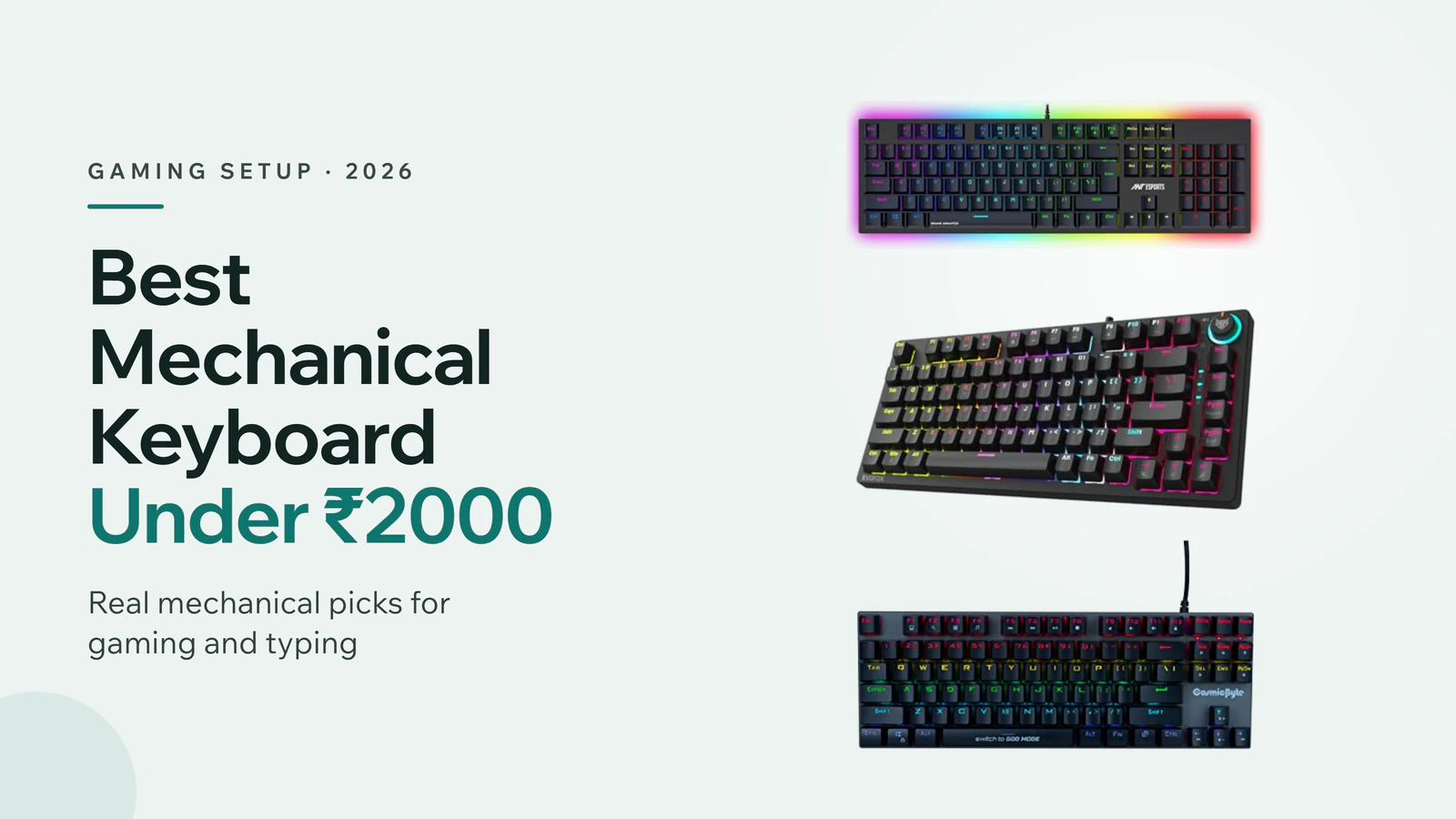
In this article
- Best Mechanical Keyboard Under 2000: Quick Answer
- The Membrane Trap: Check Before You Buy
- Best Mechanical Keyboard Under 2000 for Gaming and Work
- Best Quiet Mechanical Keyboard Under 2000
- Best Compact Mechanical Keyboard Under 2000
- Blue vs Red vs Brown Switches: Which Should You Choose?
- Full Size vs TKL vs 65%: Which Layout Is Right?
- How to Choose a Mechanical Keyboard Under 2000
- Mechanical vs Membrane Keyboard: Is It Worth Upgrading?
- Best Mechanical Keyboard Under 2000 for Typing and Coding
- Wired or Wireless Mechanical Keyboard Under 2000?
- Are Budget Mechanical Keyboards Durable?
- How to Clean and Care for a Mechanical Keyboard
- Final Word on the Best Mechanical Keyboard Under 2000
Buying your first mechanical keyboard on a budget is trickier than it looks. Many keyboards around ₹1,500 have RGB lights, a "gaming" design and words like "mechanical feel" in the title, yet they're ordinary membrane keyboards inside. Pick the wrong one and you've paid for lights, not switches. So which is the best mechanical keyboard under 2000 that's genuinely mechanical and worth the money?
This guide starts with a no-sponsorship comparison by the YouTube channel Ten Tech Home. The creator compared budget keyboards on five parameters and shortlisted three: the Ant Esports MK3400 V3 Pro, the EvoFox Katana X2 and the Cosmic Byte Pandora. We've rewritten his findings and added four more mechanical keyboards for quiet typing, compact desks and white setups, all checked on Amazon.in.
Updated 14 November 2026. Keyboard prices move often, and the same model may cost more in some colours or switch types. Prices here are approximate and were seen at the time of writing.
Best Mechanical Keyboard Under 2000 in India 2026
Three video picks plus four more real mechanical keyboards, all on Amazon.in.
- #KeyboardLayoutPriceBuy
- 1
 Ant Esports MK3400 V3 ProBest full sizeLayout: 104 keys, numpad₹1,599as of 14 Nov, 12:57 amAmazonFlipkart
- 2
 EvoFox Katana X2 TKLBest compactLayout: TKL, volume knob₹1,899as of 14 Nov, 12:58 amAmazonFlipkart
- 3
 Cosmic Byte CB-GK-25 PandoraBest for FPSLayout: 87 keys, blue₹1,849as of 14 Nov, 12:58 amAmazonFlipkart
- 4Cosmic Byte CB-GK-26 Pandora (Red)Quieter TKLLayout: 87 keys, red₹1,849as of 14 Nov, 12:58 amAmazonFlipkart
- 5
 EvoFox Katana X2 FSQuiet full sizeLayout: Full size, silent red₹1,999as of 14 Nov, 12:58 amAmazonFlipkart
- 6
 EvoFox Katana S MiniSmallestLayout: 68 keys, hot-swap₹1,599as of 14 Nov, 12:58 amAmazonFlipkart
- 7
 Redragon Kumara K552Stretch pickLayout: TKL, classic₹2,290as of 14 Nov, 12:58 amAmazonFlipkart
Watch out: the Ant Esports MK3400 V2 Pro looks the same as the V3 Pro but is a membrane keyboard.
Best Mechanical Keyboard Under 2000: Quick Answer
If you want one keyboard for gaming, typing and Excel, buy the Ant Esports MK3400 V3 Pro. It's a full-size, 104-key mechanical keyboard with a numpad, a metal top plate and a braided cable, and it costs about ₹1,500 to ₹1,600.
If your desk is small or you want more room to swing your mouse, the EvoFox Katana X2 TKL is the best compact pick, with replaceable switches and a handy volume knob. For fast FPS games like Valorant, BGMI and CS2, the Cosmic Byte Pandora's clicky blue switches feel quick and responsive. If you need a quieter keyboard for late nights or shared rooms, choose a red-switch model like the EvoFox Katana X2 FS.
The Membrane Trap: Check Before You Buy
The creator's biggest warning was about lookalikes. Ant Esports also sells an MK3400 V2 Pro. It looks almost identical to the V3 Pro and sells at nearly the same price, but it's a membrane keyboard, not a mechanical one. Many buyers order the wrong one by mistake.
So read the title and specs carefully. A real mechanical keyboard names its switches, such as Outemu Blue or Red, or says "mechanical switches" clearly. Be careful with phrases like "mechanical feel keys" or "mechanical-like". Those usually describe a membrane keyboard. When in doubt, check the customer photos of the switches under the keycaps.
Best Mechanical Keyboard Under 2000 for Gaming and Work
1. Ant Esports MK3400 V3 Pro
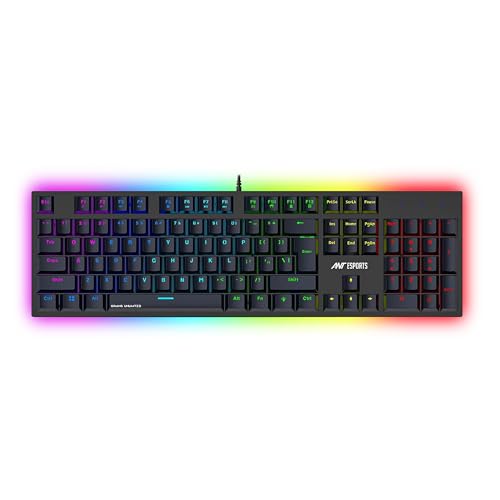 Photo: Amazon.in
- Layout: full size, 104 keys with a dedicated numpad.
- Gaming: 25 anti-ghosting keys and RGB lighting.
- Build: metal top plate, 1.5 m braided cable, spill resistant.
- Warranty: one year.
This was the creator's first recommendation, and it's the most practical keyboard here for most people. The full-size layout includes a numpad, so you can enter numbers in Excel, do calculations or fill forms without a separate keypad. At the same time, it has 25 anti-ghosting keys, so pressing several keys at once in a game won't drop inputs.
The build feels solid. The top is metal and the base is plastic, so it feels sturdy when you lift it. A 1.5-metre braided cable, spill resistance and a one-year warranty add to the value. It also has RGB lighting, but the creator's advice was clear: don't choose a keyboard for its lights. Choose it for response and typing comfort, which this one does well.
It's sold with blue, red or brown switches. Blue is clicky and loud, red is smooth and quieter, and brown sits in between. Make sure the listing says V3 Pro, not V2 Pro.
Check price on Amazon →Check price on Flipkart →
2. EvoFox Katana X2 TKL
 Photo: Amazon.in
- Layout: tenkeyless (no numpad), saves desk space.
- Switches: replaceable 3-pin clicky blue switches.
- Gaming: all-key anti-ghosting.
- Extra: volume knob for quick audio control.
The Katana X2 is built for compact gaming setups. Its TKL, or tenkeyless, layout drops the numpad, which gives your mouse much more room. That matters in shooters, where you often sweep the mouse across the desk.
Its most useful feature is replaceable switches. If one switch fails, you can swap it instead of replacing the whole keyboard. Just use compatible 3-pin switches, the type this keyboard comes with. All-key anti-ghosting means every key registers, even when you press many at once. The volume knob lets you turn the sound up or down mid-game without opening settings.
The creator said it usually sells for about ₹1,700 online. If you don't need a numpad and want a cleaner, gamer-focused desk, it's the pick.
Check price on Amazon →Check price on Flipkart →
3. Cosmic Byte CB-GK-25 Pandora
 Photo: Amazon.in
- Layout: 87-key TKL, no numpad.
- Switches: swappable Outemu Blue, clicky and fast.
- Lighting: rainbow LED.
- Best for: FPS games like Valorant, BGMI and CS2.
The Cosmic Byte Pandora is the creator's pick for fast-paced shooters. It's an 87-key TKL board, so there's plenty of space for mouse movement, and it's comfortable to use with one hand while gaming. The Outemu Blue switches respond even to a light press, and their click sound makes rapid key presses feel satisfying.
There's one small drawback. The space bar has a stabiliser, but the Enter and Shift keys don't have proper ones. If you press them gently near the edge, they may not respond until you press harder. Heavy typists will notice this. The creator said most people get used to it in a day or two, so it's not a major issue, just something to know.
Like the others, it has no numpad, so it's not ideal if you type numbers in Excel every day.
Check price on Amazon →Check price on Flipkart →
Best Quiet Mechanical Keyboard Under 2000
Blue switches are loud. If you share a room, work late or take calls while typing, a red-switch keyboard is far more pleasant for everyone around you. These two are our quieter picks.
4. Cosmic Byte CB-GK-26 Pandora (Red Switches)
Photo: Amazon.in- Same keyboard: the Pandora, with red switches instead of blue.
- Switches: swappable Outemu Red, smooth and quieter.
- Layout: 87-key TKL.
- Best for: shared rooms and long gaming sessions.
This is the same Pandora body as the creator's pick, with Outemu Red switches. Red switches are linear: they move smoothly down without a bump or a click. That makes them quieter and quick for repeated presses, which many gamers actually prefer.
It's priced about the same as the blue version. If you liked the creator's Pandora recommendation but worry about noise, this is the simple swap.
Check price on Amazon →Check price on Flipkart →
5. EvoFox Katana X2 FS (Silent Red)
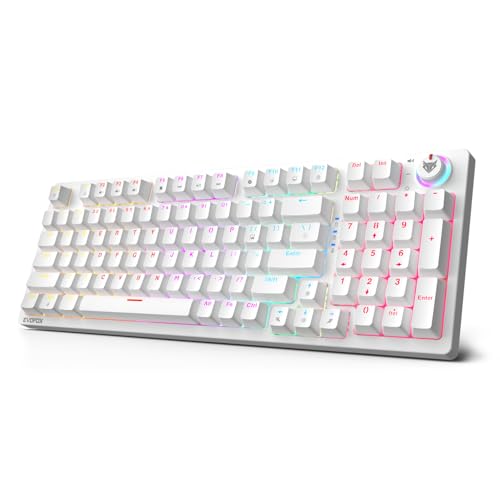 Photo: Amazon.in
- Layout: full size, with a numpad.
- Switches: replaceable 3-pin silent red switches.
- Extras: volume knob and dynamic backlighting.
- Price: close to ₹2,000 at the time of writing.
The Katana X2 FS is the full-size version of the creator's compact pick. You get the numpad back, along with replaceable switches, backlighting and the volume knob. The silent red switches make it one of the quietest mechanical keyboards in this price range.
That combination, full size and quiet, is ideal for office work, students and anyone who types a lot at home. Some sellers offer it in white, which looks great on a clean desk setup.
Check price on Amazon →Check price on Flipkart →
Best Compact Mechanical Keyboard Under 2000
6. EvoFox Katana S Mini
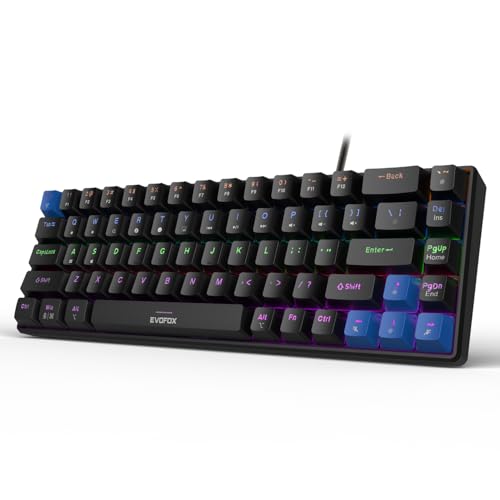 Photo: Amazon.in
- Layout: 68 keys, with arrow keys kept.
- Switches: hot-swappable silent red.
- Size: much smaller than a TKL board.
- Best for: small desks and carrying in a bag.
If even a TKL board feels big, a 65% layout like the Katana S Mini is the next step down. It drops the function row and numpad but keeps the arrow keys, which you'll miss on a smaller 60% board. That makes it practical for both gaming and everyday typing.
Hot-swappable switches mean you can pull a switch out and put a new one in without soldering. The silent red switches keep noise down. It's also small enough to carry with a laptop, which is useful for students and anyone who works from different places.
Check price on Amazon →Check price on Flipkart →
7. Redragon Kumara K552
 Photo: Amazon.in
- Layout: TKL, no numpad.
- Reputation: one of the best-known budget mechanical boards worldwide.
- Build: sturdy, with a metal-and-plastic body.
- Price: often a little above ₹2,000; buy in a sale.
The Redragon Kumara K552 has been a favourite first mechanical keyboard for years. It's tough, simple and well supported, with lots of user reviews to learn from. It usually sits a little above ₹2,000, so it's our stretch pick. During sales it often drops into budget.
Choose it if you trust a long track record more than newer models. Otherwise, the Indian brands above give you more features, like volume knobs and swappable switches, for less.
Check price on Amazon →Check price on Flipkart →
Blue vs Red vs Brown Switches: Which Should You Choose?
Blue switches are tactile and clicky. You feel a bump and hear a click on every press. They're satisfying for typing and fast gaming, but loud enough to annoy people nearby.
Red switches are linear. They move smoothly with no bump and are much quieter. Many gamers like them for quick, repeated presses. Brown switches are tactile but quiet, with a small bump and no click, so they're a good middle ground for mixed typing and gaming. If you're unsure, start with red or brown. You can learn more about how keyboard switches work on Wikipedia's keyboard technology page.
Full Size vs TKL vs 65%: Which Layout Is Right?
A full-size keyboard has 104 keys including a numpad. It's best for office work, accounting and anyone who types numbers often. A TKL, or tenkeyless, keyboard has about 87 keys and drops the numpad, giving your mouse more room. It suits gamers and people with medium desks.
A 65% keyboard, like the Katana S Mini, is even smaller. It keeps the arrow keys but drops the function row and numpad. It's great for small desks and portability, but you'll use shortcut keys for some functions.
How to Choose a Mechanical Keyboard Under 2000
The creator compared keyboards on five practical things, and they're a good checklist. First, make sure it's truly mechanical. Second, pick the right switch for your use and noise level. Third, choose a layout that fits your work and desk.
Fourth, check gaming features like anti-ghosting, which stops missed inputs when you press many keys. Fifth, look at build and warranty: a metal top plate, a braided cable, spill resistance and at least a one-year warranty. RGB lighting is a bonus, not a reason to buy.
Mechanical vs Membrane Keyboard: Is It Worth Upgrading?
A mechanical keyboard has a separate switch under every key. That gives each press a consistent feel and makes the keyboard last much longer than a membrane board, which uses a rubber sheet that wears out. Mechanical keys also respond more precisely, which helps in games.
For long typing sessions, many people find mechanical keyboards less tiring because you don't need to press keys all the way down. At under ₹2,000, the upgrade is now affordable. Pair it with a good mouse from our best mouse under 500 guide for a complete budget setup.
Best Mechanical Keyboard Under 2000 for Typing and Coding
For typing, coding and writing, comfort and noise matter more than gaming features. A full-size keyboard with brown or red switches, like the Ant Esports MK3400 V3 Pro or the EvoFox Katana X2 FS, is ideal. You keep the numpad and avoid the loud clicks of blue switches during long sessions.
If you code on a laptop, a compact keyboard like the Katana S Mini is easy to carry and works well with a laptop stand. Looking for a new laptop to go with it? See our best laptop under 40000 picks.
Wired or Wireless Mechanical Keyboard Under 2000?
At this price, wired is the smarter choice. A wired keyboard has no battery to charge, no connection drops and no input delay, which matters in games. Every keyboard in our list is wired for that reason.
Wireless mechanical keyboards do exist near this budget, including tri-mode versions of the EvoFox Katana with Bluetooth and a 2.4GHz dongle. They're handy if you switch between a laptop, tablet and phone. But they usually cost more for the same switches, so you trade build quality for convenience. If you want the best mechanical keyboard under 2000 for gaming, stay wired.
Are Budget Mechanical Keyboards Durable?
Yes, more than most people expect. Mechanical switches are rated for tens of millions of presses, so the switches usually outlast the cable or the keycaps. Keyboards with swappable switches, like the EvoFox Katana X2 and Cosmic Byte Pandora, are even easier to keep running, because one bad switch is a cheap fix.
The parts that wear first are the keycap legends and the cable. Choose a keyboard with a braided or detachable cable, and avoid yanking it from the PC. Treat a mechanical keyboard under 2000 with basic care, and it should last several years of daily use.
How to Clean and Care for a Mechanical Keyboard
Turn the keyboard upside down and shake it gently every week to remove crumbs. Once a month, use a keycap puller to remove the keycaps and clean underneath with a soft brush or compressed air. Wash keycaps in lukewarm soapy water, and dry them fully before putting them back.
Avoid eating over the keyboard, even if it's spill resistant. If a liquid spills, unplug it immediately, turn it upside down and let it dry for a full day before using it again. With basic care, a mechanical keyboard lasts many years.
Final Word on the Best Mechanical Keyboard Under 2000
The best mechanical keyboard under 2000 for most people is the Ant Esports MK3400 V3 Pro: full size, sturdy and great for both gaming and work. Pick the EvoFox Katana X2 TKL for a compact gaming desk, and the Cosmic Byte Pandora for fast FPS games. If noise matters, go for red switches, like the Pandora CB-GK-26 or the Katana X2 FS. Most importantly, check that the keyboard is truly mechanical before you buy, and don't let RGB lights decide for you. For a better audio setup to match, see our best headphones under 5000 guide.
Frequently asked questions
Which is the best mechanical keyboard under 2000 in India?
The Ant Esports MK3400 V3 Pro for most people, thanks to its full-size layout, metal top plate and anti-ghosting. The EvoFox Katana X2 TKL is the best compact pick, and the Cosmic Byte Pandora suits FPS gaming.
Is the Ant Esports MK3400 V2 Pro mechanical?
No. The V2 Pro looks almost the same as the V3 Pro but is a membrane keyboard. Buy the MK3400 V3 Pro if you want a real mechanical keyboard.
Which switch is best for gaming, blue or red?
Red switches are smooth and quiet, so many gamers prefer them for quick repeated presses. Blue switches are clicky and satisfying but loud. Brown switches are a quiet, tactile middle ground.
Is a TKL keyboard good for office work?
It's fine for typing, but it has no numpad. If you enter numbers in Excel every day, choose a full-size keyboard like the Ant Esports MK3400 V3 Pro or EvoFox Katana X2 FS.
2000 ke andar sabse achha mechanical keyboard kaunsa hai?
Gaming aur office dono ke liye Ant Esports MK3400 V3 Pro lo. Chhote desk ke liye EvoFox Katana X2 TKL achha hai, aur kam awaaz chahiye to red switch wala keyboard lo. V2 Pro mat lena, wo membrane hai.